
Connect the AI tools you already use to Locate Alpha’s real estate intelligence — land search, comps, demographics, and dealflow — from a single prompt.
You’re already using Claude or ChatGPT for parts of the job. Now you can connect them directly to Locate Alpha. Land search, rent comps, sale comps, demographics, and the Locate Alpha Dealflow Manager are all accessible from a single prompt — without opening the platform, navigating menu bars, sifting through results, or remembering where the buttons are.
If you need a quick answer, you can just type (or dictate) what you want, and your AI tool goes to work and pulls the data from Locate Alpha. You get back data, tables, and map and comp-set links ready for review. Follow any link to jump straight into Locate Alpha for a deeper dive. Same reliable data — without opening another piece of software.
This is possible because we’ve expanded the Locate Alpha MCP server — a direct connection between the AI agents you already use and our real estate intelligence services. This article explains what that means, what you can do with it, and how to get started.
Why Real Estate Intelligence Needs an Agent Interface
The way people interact with software is changing. More of the work is moving traditional user interfaces to conversations with AI agents — Claude, Cowork, ChatGPT, and others — that can research, compare, summarize, and take action on your behalf.
Most real estate data products were built around a human-facing interface: screens, maps, and tables designed for navigation, attention, and decision support.
But a first pass on a deal is increasingly happening in an AI tool. The interface comes in later when you need a deeper look.
That’s the gap the Locate Alpha MCP server closes. It gives Locate Alpha a second interface — one designed for agents — so the data and workflows you already trust are available wherever you prompt.
What Analysts Want to Do From a Prompt
Real estate teams are already trying to bring their Locate Alpha workflows into agent environments. With the MCP server, you can:
• Ask for land in plain language instead of performing the search manually in a UI.
• Pull comps and demographics without switching tabs.
• Generate maps, reports, and one-pagers from data you can share with your team.
• Move promising sites into Locate Alpha Dealflow without manually copying data between systems.
• Complete a first pass of land search, market research, comp analysis, and deal triage using the same data you already trust in Locate Alpha.
What MCP Is, Briefly
MCP (Model Context Protocol) is an open standard for connecting AI agents to external tools, data, and workflows. Put simply, it’s like an API designed for AI agents: it tells the agent what tools are available, what inputs they need, and what structured results they return. Instead of scraping pages or guessing how a product works, the agent gets a reliable, structured way to use Locate Alpha.
The goal is simple: you ask your agent a real estate question, and the agent uses Locate Alpha services to answer it with real data. It works inside Claude, Cowork, or any MCP-compatible agent — no code required.
What You Can Access Through Locate Alpha MCP
The upgraded MCP server focuses on the workflows that matter most in land acquisition and real estate research:
Land Search
Search for parcels by location, lot size, acreage, zoning, ownership, opportunity zones, school score, flood zone, demographics, and proximity constraints.
Demographics
Analyze the population, income, age, housing, and growth profile around a location using a radius or drive-time area.
Sale Comps
Pull nearby sale comparables by radius and recency to understand pricing, value, and market support around a target site.
Rent Comps
Pull rental comparables to understand income potential for a site or development thesis.
Dealflow
Create and list projects so interesting opportunities move from research straight into a reviewable pipeline.
Maps and Links
Results can include Google Maps links, CMA links, and project links, so you can quickly inspect the agent’s work and jump into Locate Alpha for a deeper dive.
Access is authenticated. Agents can only use the data and workflows available through your own Locate Alpha credentials.
Push Deals From Prompt to Platform
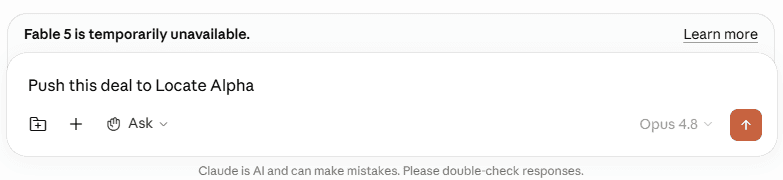
The connection runs both ways. Complete your first-pass deal screening from the AI prompt, and once you identify a site worth a closer look, push it directly into the Locate Alpha Dealflow Manager.
From there, you run the deep, structured analysis Locate Alpha is built for — using your custom-configured rules and analysis models. The prompt handles the fast, repetitive screening; the platform handles the comprehensive review. You move from results to action in one seamless flow.
Why This Matters for Land Acquisition
Land acquisition isn’t a single search. It’s a chain of decisions: you start with an acquisition thesis, source candidate sites, screen out weak fits, validate the surrounding market, check comps, underwrite the opportunity, and then decide whether to pursue, save, negotiate, or walk away.
MCP is useful because an agent can move across that chain without forcing you to jump between disconnected tools.
Imagine you type a single prompt:
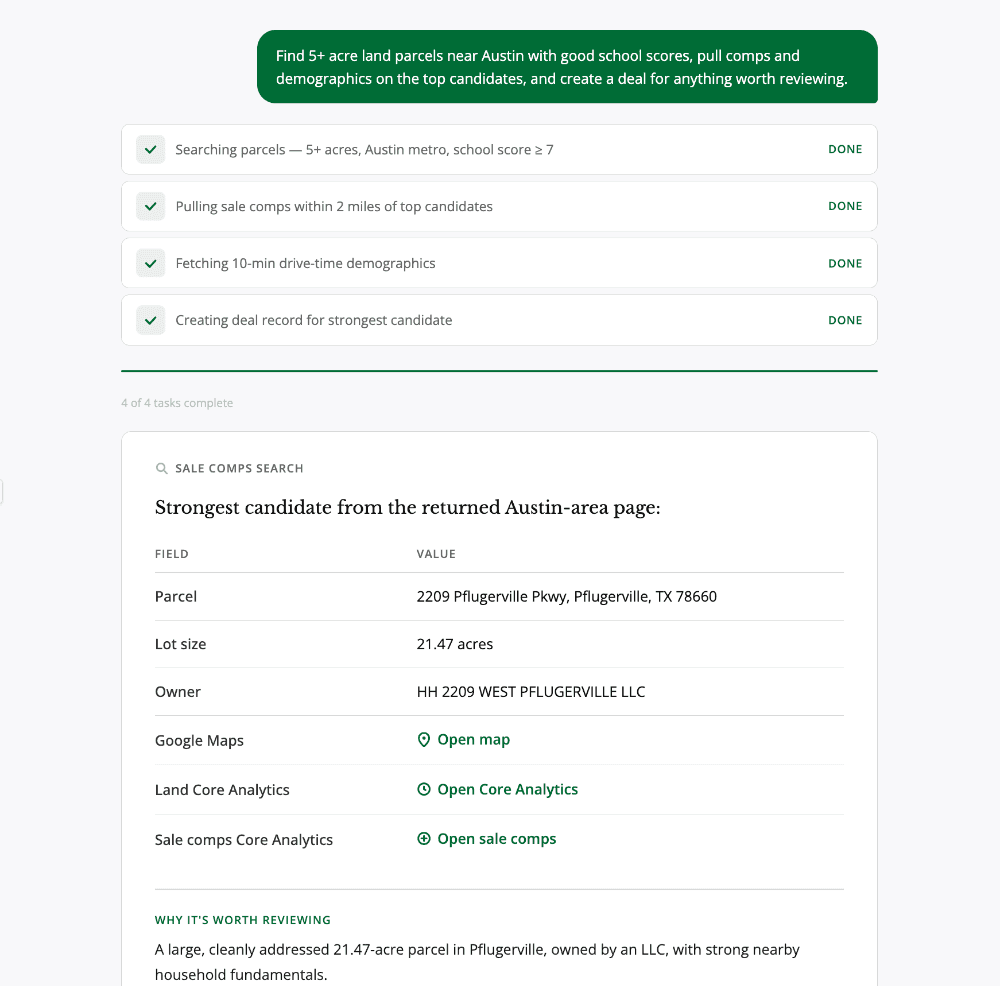
“Find 5+ acre land parcels near Austin with good school scores, get comps and demographics on the top candidates, and create a deal for anything worth reviewing.”
With Locate Alpha MCP, the agent breaks that request into a workflow and runs it end to end:
1. land_search — finds 5+ acre parcels near Austin filtered for strong school scores.
2. demographics_search — profiles the population, income, and growth around the top candidates.
3. sale_comps_search — pulls nearby sale comparables to gauge pricing and value.
4. rent_comps_search — pulls rent comparables to gauge income potential.
5. dealflow — creates a deal for each candidate that meets your review criteria.
You get back the parcels, comp tables, and demographic summaries, along with Google Maps, CMA, and project links. Click any link to open it in Locate Alpha and continue the analysis where the platform is strongest.
Getting Started
The Locate Alpha MCP works inside Claude, Cowork, or any MCP-compatible agent. No code is required, and existing customers can be connected in minutes.
Conclusion
The future of real estate intelligence isn’t only a better dashboard. It’s an agent-ready interface that lets you bring Locate Alpha into the tools where you already work. The UI remains the place for exploration, inspection, and final judgment. MCP becomes the interface for agent-led research, analysis, and workflow handoff — structured, authenticated, and reviewable from the first prompt to the saved deal.